
Good news. That is precisely what NSFW image to video AI is built for. Instead of dreaming up a whole scene from a text prompt and praying the AI gets it right, you hand the model an image you already love and it adds the motion. The result is a short, uncensored clip that looks the way you wanted, because it started from a frame you already approved.
In this guide we will explain how NSFW image to video AI actually works, walk you through animating an image step by step, share the prompting tricks the pros use, and troubleshoot the glitches that drive people up the wall. By the end you will be able to turn a great still into a great clip with DarLink AI, no technical skills required.
What is NSFW image to video AI?
NSFW image to video AI is a tool that takes one still image and generates a short adult video from it, usually 3 to 6 seconds long, where the character moves, breathes, shifts their weight, or performs a simple prompted action. The "NSFW" part means explicit content is allowed for adults at 18 and over, and the "image to video" part means your starting point is a picture rather than a blank text box.
This matters more than it sounds. There are two ways to make AI video:
- Text to video, where you describe everything in words and the model invents the whole scene from scratch. More gambling, less control.
- Image to video (i2v), where you feed the model a finished frame and it only has to animate what is already there.
Image to video wins for one simple reason: the person, the pose, the body, and the style are already correct. The AI is not guessing what your character looks like, it is just moving them. That is why it is the most reliable way to make consistent NSFW clips in 2026.
How it works under the hood
You do not need a computer science degree, but a quick peek behind the curtain helps you get better results.
These tools use image-conditioned video diffusion. In plain English, the model reads your source image as the first frame and then generates the frames that follow, using something called temporal attention to keep each new frame consistent with the last one. It is constantly asking "what would the next split second of this picture look like?" and painting that, over and over, for a few seconds.
The better tools anchor hard to your first frame, so the face and body stay recognizable instead of morphing into a stranger. Some go further with facial identity preservation, locking the character's face across the whole clip. The takeaway for you is this: your input image is the foundation. A clean, sharp, well-lit starting image gives the model a strong anchor, and a messy one gives it permission to get weird.
How to turn an image into an NSFW video, step by step
Here is the full workflow using DarLink's generator, which keeps the whole process in one place so you never have to bounce between apps.
Step 1: Start with a strong source image
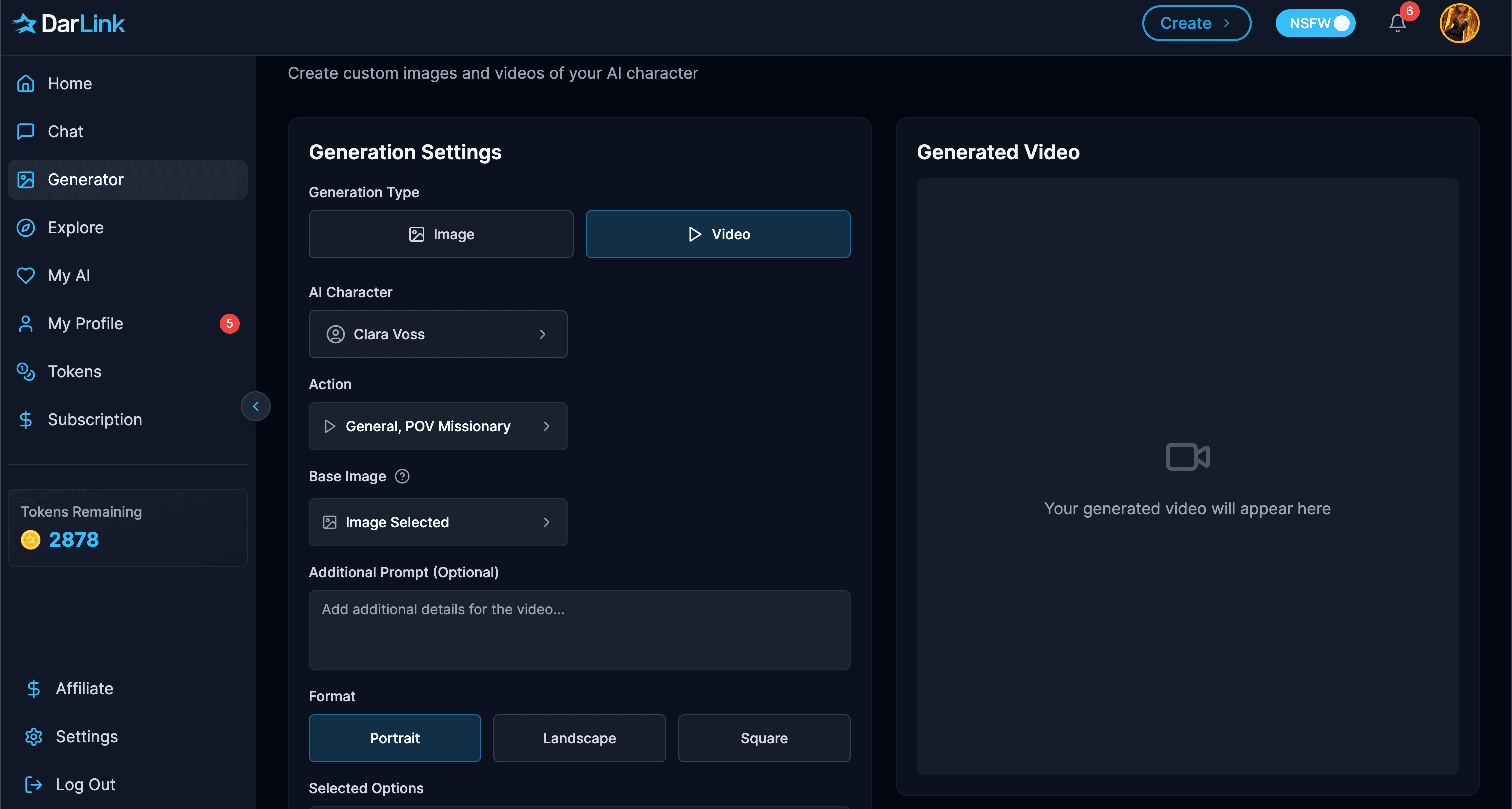
Everything downstream depends on this. Open the generator, set the type to Image, and either pick one of your existing AI characters or create a new image with parameters or a text prompt. Aim for:
- A sharp, high-resolution image with no obvious artifacts (blurry hands and faces only get worse once they move).
- Clear, consistent lighting. Mixed or chaotic lighting confuses the model.
- A little breathing room in the frame. If you want movement, do not crop your character so tightly that they have nowhere to go.
If you do not have a character yet, build one first with the character creator so you get a consistent face and body to animate again and again.
Step 2: Switch to video and choose image to video
In the generator, flip the type from Image to Video, then choose to animate your existing character or image rather than starting from text. This is the image-to-video path. You are telling DarLink "use this exact frame as the starting point."
Step 3: Write a motion prompt that actually works
This is where most people go wrong. They write "make it sexy" and wonder why the clip barely moves. The model needs direction. Describe exactly what should move and how:
- Name one or two motions, not ten. "Slow hip sway and a soft smile" beats a paragraph of conflicting actions.
- Add speed and direction. Words like slow, gentle, gradual, and moderate genuinely change the output. A slow movement and a rapid one feel completely different.
- Use simple camera language if your tool supports it: a slow zoom in, a gentle pan, a static shot. Keep the pacing consistent.
- Say what stays still too. Anchoring the background or the face helps the model focus its motion where you want it.
A clean example: "Gentle slow motion, the character shifts weight and smiles softly, hair moves lightly, static camera, soft warm lighting." That is specific, consistent, and achievable.
Step 4: Set length, format, and style
Pick your clip length (shorter clips almost always look cleaner and more consistent), choose Portrait, Landscape, or Square to match where you will watch it, and confirm the visual style. DarLink supports realistic, anime, furry, fantasy, and cartoon, so an anime source pairs naturally with the anime style, and so on. If you are into a specific look, browsing the content categories first is a fast way to find the vibe you want.
Step 5: Generate, review, and refine
Hit generate and give it a moment. When the clip lands, judge it honestly. Did the motion match the prompt? Did the face hold up? If something is off, do not rewrite everything at once. Change one variable, regenerate, and compare. This A/B habit is how you learn what your tool responds to. Keep a little note of the prompts that worked, because future you will thank present you.
When you nail a combination you love, save it. Half the skill in image to video is building a personal library of prompts and source images that reliably deliver.
Pro tips for better NSFW image to video results
A few habits separate clean clips from cursed ones:
- Quality in, quality out. A flawless source image is worth more than any clever prompt. Fix artifacts before you animate, never after.
- Leave room to move. Full-body or mid-shot framing gives the model space to create believable motion. Extreme close-ups limit it.
- Respect the motion range. Today's models are great at subtle movement: weight shifts, slow gestures, fabric and hair motion. They are bad at fast, complex choreography. Work with the grain, not against it.
- One character is easier than two. Two figures interacting in the same frame is still where most tools fall apart. Solo scenes are far more reliable.
- Match style to source. Animating a realistic image in an anime style, or vice versa, invites glitches. Keep them aligned.
Common problems and how to fix them
The clip barely moves. Your prompt was too vague or your subject was cropped too tightly. Add a clear motion instruction and use a source image with space around the character.
The face drifts or changes. Your source image may be low resolution or poorly lit, or you asked for too much motion. Start sharper, light it cleanly, and dial the movement down.
Hands and hair go haywire. This is the classic limitation. Choose source images where hands are simple and visible, avoid prompts that demand intricate hand action, and keep clips short so there are fewer frames to break.
Two people turn into a mess. Stick to one character per clip for now. If you need a scene with two, generate them separately and edit, rather than asking the AI to choreograph both at once.
It looks slightly off-model. Regenerate with the exact same image but a calmer prompt. Sometimes the fix is simply asking for less.
The best tools for NSFW image to video in 2026
Not every platform handles image to video well. These are the ones that do, and you can see the full ranked breakdown in our guide to the best NSFW AI video generators with no limit.
- DarLink AI is the easiest all-in-one option, because your image, your character, and your video all live in the same place, with persistent memory so your companion stays consistent across clips.
- OurDream AI stretches clips up to 30 seconds and supports lip-sync, the pick if you want longer, talking scenes.
- SoulGen leans on a facial identity system that holds a face across frames extremely well, ideal when a perfect face is your priority.
- Seduced AI focuses on near-photoreal short clips for users who prize raw realism.
For most people who just want to animate a great image quickly and privately, DarLink is the simplest path from picture to clip.
Staying legal and ethical
One firm rule, no exceptions. Animate AI-generated images of fictional, adult characters only. Do not upload or use photos of real people to create sexual content. Generating explicit material of a real, identifiable person without their consent is illegal in many countries and banned by every reputable platform and payment processor. Stick to your own AI creations and you stay firmly on the right side of the line, which is also where the best, most consistent results live anyway.
Frequently asked questions
What is the best NSFW image to video AI?
For an easy, private, all-in-one workflow, DarLink AI is the top pick, because it keeps image creation, character memory, and video generation in one tool. OurDream AI is better if you want longer clips with lip-sync, and SoulGen excels at locking a face across frames.
How long are image to video NSFW clips?
Most tools produce 3 to 6 second clips. A few reach up to 30 seconds. Shorter clips almost always look smoother and more consistent, since the model has fewer frames in which the character can drift.
Can I animate any image?
You can animate AI-generated images of fictional characters. You should never use photos of real people to make sexual content, as that is illegal in many places and against platform rules. For best results, the source image should be sharp, well lit, and not too tightly cropped.
Why does my clip look glitchy?
Usually because the source image had artifacts, the lighting was inconsistent, or the prompt asked for too much fast or complex motion. Start with a clean image, keep the motion subtle, and limit yourself to one or two clear actions.
Is image to video better than text to video for NSFW?
Generally yes. Image to video is conditioned on a frame you already approved, so the character, pose, and style are correct from the start and the model only has to add motion. Text to video has to invent everything, which is less predictable.
The bottom line
NSFW image to video AI is the most reliable way to turn a still you love into a clip that moves, because it starts from a frame that is already right. Nail the source image, write a focused motion prompt, keep the action subtle, and refine one step at a time. Do that and you will get clean, consistent results far more often than not.
Ready to watch your favorite image come to life? Open the DarLink generator, create your character, and turn your next still into a video in a couple of clicks. 😈